
Products βΊ HubSpot Backup
HubSpot Backup
#1 for HubSpot Backup Β· 51 Objects Protected
More Objects Backed Up Than Any Competitor Β· Setup in 5 Minutes
Your contacts, deals, pipelines, workflows, and marketing campaigns live in HubSpot. None of it is automatically protected. SaaSAssure backs up more HubSpot objects than any other solution on the market.
IMPORTANT NOTE
HubSpot's recycle bin holds deleted data for 90 days only. After that, it is permanently gone. HubSpot Support cannot get it back. There are no exceptions.
More than any competitor
#1 for HubSpot
Backup
All systems live
Backup
Full and incremental supported
Restore
Automated restore supported
Export
Secure data export supported
Why It Matters
Over 205,000 businesses run HubSpot as their core CRM and marketing platform. Human error, bad imports, misfired automations, and departing employees all create real data loss risk. None of it is covered by HubSpot's native tools beyond a 90-day window.
SECTION 5: CUSTOMER DATA
β5.1 CUSTOMERβS PROPRIETARY RIGHTS. YOU OWN AND RETAIN ALL RIGHTS TO THE CUSTOMER MATERIALS AND CUSTOMER DATA...β
View Terms
Records deleted by accident, a departing employee, or a compromised account. You have 90 days to catch it. After that, the data is gone permanently.
Data overwritten by a bad import, misfired workflow, or AI automation. HubSpot has no native recovery path for this.
A sales manager deleted 12,000 contacts during a CRM cleanup. Nobody noticed for four months, well past HubSpot's recovery window. Rebuilding the database cost $85,000 in staff and consultant time. A SaaSAssure subscription costs $3 per user per month.
SaaSAssure for HubSpot
Every feature is built around one goal: when something goes wrong, you can restore exactly what was there before.
Security First
Strong security controls protect your backup data from unauthorized access, insider threats, and ransomware.
Backup and Recovery
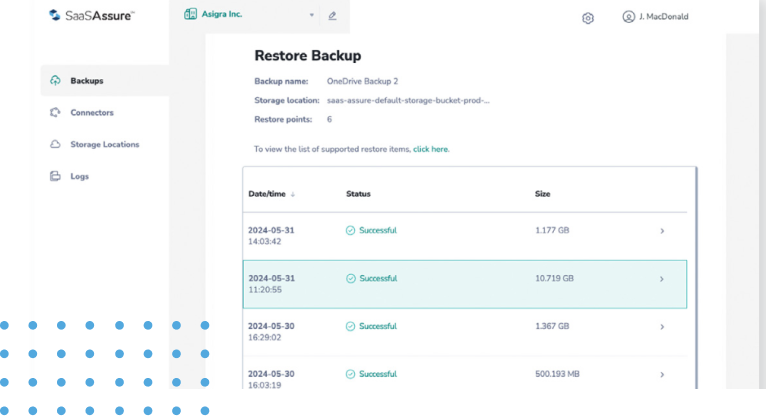
999 point-in-time restore points. One-click recovery. Restore the full data set or a single contact.
Data encrypted in transit with TLS 1.3 and at rest with AES-256.
SaaSAssure Cloud, AWS S3, Google Cloud, Wasabi, or any S3-compatible storage.
More HubSpot objects than any other backup solution. More on the way.
MSP Partner Program
SaaSAssure gives MSPs automatic HubSpot backup and recovery to protect clients from all forms of data loss. Built with MSP operations in mind: multitenancy, client dashboards, billing exports, and flexible storage.
"If your team accidentally deleted 5,000 HubSpot contacts today, and nobody noticed for four months, what would the recovery look like?" For any client without backup, the answer is: start over. That's your opening.
All client HubSpot accounts in one dashboard.
Job status by client. Failure alerts scoped per account.
Per-client usage exports for clean MSP invoicing.
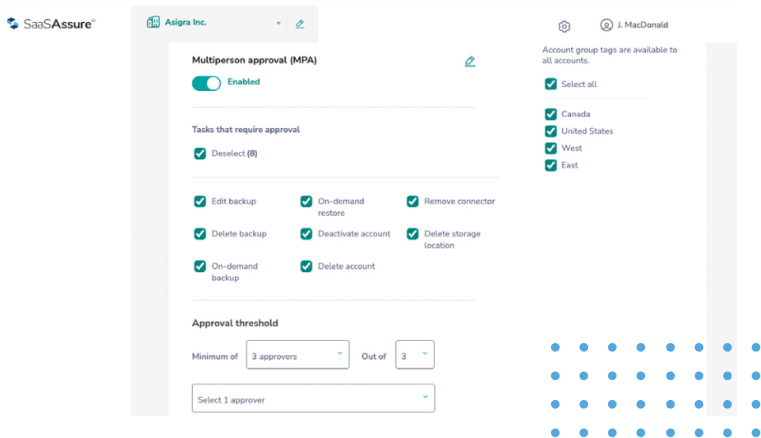
Industry-first governance. Protects you and your clients.
IT Risk Assessment
A plain breakdown of every critical data category, what you lose if it goes wrong, and what it costs to rebuild from scratch.
Once HubSpot's 90-day window has passed, or if data was corrupted rather than deleted, recovery without independent backup is not difficult. It is impossible.
Broadest Coverage in the Market
Most tools back up records. SaaSAssure backs up the full data graph: objects with their associations, property groups, pipeline structures, and engagement history.
Transparency is how we compete. We publish our full object matrix. Ask any competitor for theirs.
How We Compare
HubSpot has improved its native recovery tools. The risk now sits in the time limits, plan restrictions, and gaps those tools leave behind.
Recycle bin holds deleted records for 90 days.
Restores up to 10,000 records at a time, filterable by date, user, or workflow.
Day 91 means gone for good.
Deletions discovered after 90 days cannot be recovered natively.
Large incidents must be restored in batches of 10,000.
HubSpot notes some associated data is still lost when a contact is restored, such as static list membership.
Restore deleted records from an independent backup, with no 90-day cutoff.
Records return with their associations.
Bypass the recycle bin entirely.
Removed from user access immediately.
One click, no safety net.
A permanent delete, whether a mistake or a malicious act, cannot be undone with any native tool.
There is no recycle bin entry to restore from.
A copy of the record exists outside HubSpot and can be restored if the deletion was not intended.
Restore CRM changes rolls records back to any point in the last 14 days.
Covers manual edits, imports, integrations, and workflows.
Smart CRM Professional and Enterprise only.
Rollback expires at day 14.
Errors found after 14 days require exporting property history and re-importing it by hand, one property at a time.
The manual method cannot restore values that were previously blank.
Starter accounts have no native rollback.
Point-in-time restore to any backup in your retention period, not just the last 14 days.
Same 14-day rollback, filtered by source, object, property, and date.
Manual undo is possible after that by exporting history and re-importing.
Silent corruption outlives the window.
Bad imports often surface weeks later in pipeline or quarterly reporting, after native rollback has expired.
Manual repair across thousands of records and many properties can take days of admin time.
Identify the last clean backup and restore affected records to that state.
Workflow-level undo restores property changes made by a specific workflow within 14 days.
Automation runs quietly.
A misfiring workflow can touch every enrolled record nightly; if it is not caught within 14 days, recovery reverts to manual fixes.
Deletions made by the workflow follow the recycle bin rules above.
Roll affected records back to a backup taken before the workflow ran, however long ago that was within retention.
No native unmerge.
Merged records do not pass through the recycle bin.
Two records become one, permanently.
Overwritten property values and separate record identities cannot be restored natively.
HubSpot lists unmerge on its roadmap with no committed timeline.
Recover the original records and their property values from a backup taken before the merge.
Recycle bin, restore tools, and native backups are all managed inside the same HubSpot account.
Your recovery tools sit inside the blast radius.
Anyone with admin access can permanently delete records, bypassing the recycle bin, and can reach native backup settings.
Native backup files must be downloaded within 14 days or they expire.
Backups are stored outside HubSpot behind separate authentication, MFA, and multi-person approval for destructive actions.
Native Backup & Restore exports CRM records and property values as CSV files.
Weekly on Starter and Professional; daily on Enterprise. Super Admin required.
Records come back disconnected.
Associations and activity history are not included, so a CSV restore produces records that no longer link contacts, companies, deals, and tickets.
There is no one-click restore from these files; they must be imported manually in the correct order.
Automated backups that preserve associations, with guided restore back into HubSpot.
Native capabilities reflect HubSpot Knowledge Base documentation as of October 2026. Feature availability varies by HubSpot subscription.
See how HubSpot backup and restore works in practice, and why covering 51 objects is the difference between full recovery and starting from scratch.
For customers whose SaaS data is not just valuable but vital, SaaSAssure has been a real difference maker. The simplicity and rapid deployment provide solid data protection that scales without fuss.
With today's focus on data security, SaaSAssure gives IT leaders a straightforward way to protect all their SaaS applications and recover quickly when something goes wrong.
51 objects backed up today Β· 5-minute setup Β· 999 restore points Β· Storage Awards 2025